|
Supported Models
Sony Ericsson
'Fastport' connector type | Sony Ericsson K618 | K618i | K310 | K310a | K310c | K310i | K320 | K320a | K320i | K320c
D750i
SonyEricsson K510 | K510i | K510a | K510c
Sony Ericsson K600 | K608i | K610 | K610i | K750i | K750c | K758 | K790 | K790i | K790a | K790c | K800 | K800i | K800c
Sony Ericsson V630 | V630i
Sony Ericsson W300 | W300i | W300c | W300a
Sony Ericsson W550 | W550i | W550c
Sony Ericsson W600 | W600i
Sony Ericsson W700 | W700i | W700a | W700c
Sony Ericsson W710 | W710a | W710c | W710i
Sony Ericson W800 | W800i | W810 | W810a | W810i | W810c
| W850 | W850a | W850i | W850c
SonyEricsson W900a | W900i | W900c
Sony Ericsson P990i | P990i | P990c
Sony Ericsson S600 | S600i
Sony Ericsson Z520a | Z520i | Z520c
| Z525i | Z525a | Z530 | Z530i | Z530c | Z550 | Z550a | Z550i | Z550c | Z558i | Z558c
Sony Ericsson Z610
Sony Ericsson Z710 | Z710a | Z710i | Z710c
|
This cable is only for use with unlocking/flashing software. |
Description
- Brand new generic cable
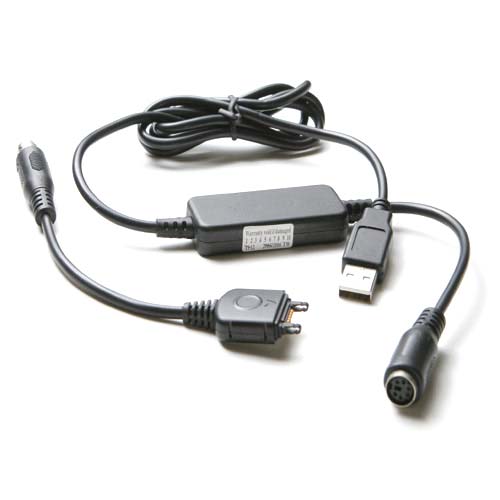
- Quantity: 1 set (includes 2 cables)
- Interface: USB
- USB drivers are supplied after the purchase
- Fully compatible with the following unlocking tools:
- Total multiserver software (Remote Unlocking, Language change, Firmware upgrade, Conversion, Decustomization)
- Fighter/Cruiser tool
- SEtool
- USB Smart dongle
- Other SonyEricsson Unlocking software
|
Package contents
- 1 Multiserver cables (PS/2 interface)
- 1 Extension cable (PS/2 -> usb Interface)
The main advantage of this configuration is that as newer phone models appear on the market more cables can be ordered to be connected to the extension cable (PS/2 connector).
CAUTION: Don't plug PS/2 side of the cable into PC PS/2 port, it will damage both PC and the cable.
|
|
|
|
|